Voor applicaties
Mensen lezen Depositori in de browser. Software leest dezelfde definities op twee manieren. Beide staan op de pagina Organisatie.
Een AI-agent koppelen (MCP)
Section titled “Een AI-agent koppelen (MCP)”Voor Claude, ChatGPT of een andere AI-agent die je zelf gebruikt.
- Open Organisatie en zoek Een AI-agent koppelen.
- Kopieer het adres en voeg het in je agent toe als connector. De stappen voor Claude, ChatGPT en Claude Code staan onder het adres.
- De agent vraagt je één keer om je bij Depositori aan te melden. Daarna werkt hij in je organisatie als jou, met jouw rol.
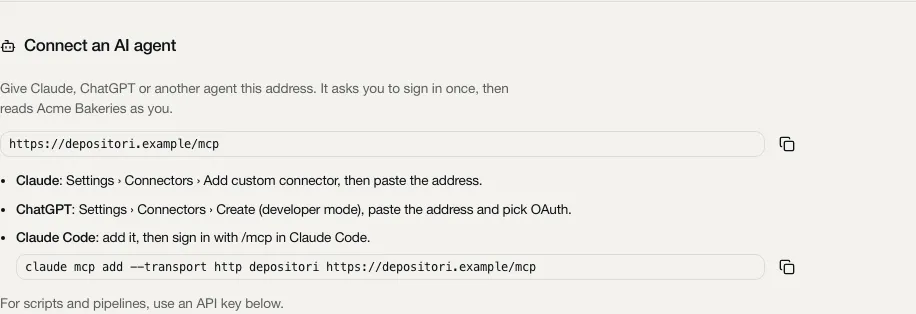
Niets te plakken behalve het adres, en geen sleutel om veilig te bewaren. Je ziet en ontkoppelt je agents onder je naam linksonder, Gekoppelde apps.
Wat een agent kan
Section titled “Wat een agent kan”Alles wat jij in de app kunt, kan je agent ook, als tool, en niets meer. Hij krijgt de tools van jouw rol: de agent van een lezer leest, stelt vragen en stelt wijzigingen van KPI’s voor; die van een bijdrager bewerkt ook de begrippenlijst, notities en beschrijvingen; die van een eigenaar beheert ook verbindingen, imports en mensen; die van een beheerder beheert ook de werkruimte. Je rol wordt bij elke aanroep opnieuw gecontroleerd in de organisatie die de aanroep noemt. Een tool die je rol niet heeft, staat niet in de lijst, en wordt geweigerd voordat hij draait als de agent hem toch aanroept.
- Als jou. Een agent die zo gekoppeld is, handelt in jouw naam. Wat hij wijzigt staat op jouw naam, bijvoorbeeld in de geschiedenis van een KPI of een open punt. Een voorstel voor een KPI, een goedkeuring en elke wijziging van een open punt doet altijd een persoon, dus alleen een agent die als jou is aangemeld kan ze doen, geen API-sleutel.
- Hij vraagt het eerst. Wat niet ongedaan kan worden, zoals een import of verbinding verwijderen, iemand verwijderen of een API-sleutel intrekken, vraagt een uitdrukkelijke bevestiging in de tool. Een goede agent vraagt het jou voordat hij bevestigt.
- Live cijfers. De rekentools (
query_kpi,query_metrics,list_values,run_dax) zijn er alleen als een Beheerder query’s voor de organisatie heeft toegestaan (Query’s via de API toestaan onder Organisatie bewerken).run_daxvoert een eigen DAX-query van de agent uit op een model, dus het kan detailrijen teruggeven, niet alleen totalen: hooguit 200, zonder persoonlijke en afgeschermde kolommen en met gemaskeerde e-mailadressen. Daarom is het alleen voor een aangemelde persoon, nooit voor een API-sleutel.
Wat in de app blijft
Section titled “Wat in de app blijft”Een paar dingen doet een agent nooit. Daarvoor geeft de agent je een link naar het juiste formulier in de app, om zelf te openen:
- Geheimen: een API-sleutel maken (het token), een databaselogin toevoegen, de AI-sleutel instellen, en een bedrijfsaanmelding toevoegen of wijzigen (het client secret). Een wachtwoord, sleutel of client secret gaat nooit door de context van een AI.
- Aanmeldingen: een Microsoft-account of een ander bronaccount koppelen, wat in je browser gebeurt.
- Uploads: bestanden zoals een Power BI-sjabloon.
- Bevestigen dat een tool van een andere toolserver alleen leest (Leest alleen): een agent staat niet in voor de tools die hij daarna zelf mag aanroepen.
- Goedgekeurde audiences: waarheen de tokens van de app-accounts van een organisatie mogen, de keuze van een Beheerder.
- De chat met Taki: de agent is zelf de AI, en krijgt de tools van Taki om te lezen en te rekenen.
Elke tool, per rol
Section titled “Elke tool, per rol”Elke rol heeft de tools van de rollen erboven in de lijst, en meer. Alleen een persoon betekent dat een API-sleutel de tool nooit krijgt. Kies een rol om de tools te zien. De beschrijvingen zijn die van de tools zelf, in het Engels.
Lezer (59 tools)
| Tool | Doet (Engels) | Soort |
|---|---|---|
approve_kpi_suggestion | Approve a suggestion on a KPI you own | overschrijft of verwijdert, alleen een persoon |
call_tool | Run a read-only tool of a connected MCP server | leest, bereikt een ander systeem |
compare_model | A model's original source, its Ossie document and its translation to target side by side, per dataset, field, relationship and metric | leest |
confirm_open_point | Confirm that the source now matches the approved definition, after the model was read again: the point closes | overschrijft of verwijdert, alleen een persoon |
decline_open_point | Close an open point as won't do, with the reason | overschrijft of verwijdert, alleen een persoon |
describe_metric | A metric of a model | leest |
describe_table | A table of a model | leest |
draft_open_point_query | Have the organisation's AI draft the proposed query of an open point (replacing the one there), marked as an AI draft that a person checks | overschrijft of verwijdert, bereikt een ander systeem, alleen een persoon |
find | Find KPIs, metrics and tables by the organisation's own words, best first, each with why it matched (its name, a synonym, a concept, its definition) | leest |
fork_kpi_suggestion | Make a suggestion on a KPI you own a new KPI of its own, named name | voegt toe, alleen een persoon |
get_analyst_status | Whether Taki, the organisation's AI analyst, can answer and, for what is missing, who may fix it | leest |
get_concept | A business concept | leest |
get_connection_metadata | A warehouse connection's latest metadata snapshot (a summary, or with full every definition) and its history | leest |
get_job | One of your jobs | leest |
get_kpi | A KPI in full | leest |
get_kpi_governance | A KPI's owners (by display name), its open suggestions to change the definition with who approved and who is still to, the history of suggestions and decisions, and what uses it (models, Power BI reports, dbt models, agents) | leest |
get_model | A model as the site shows it | leest |
get_model_document | A model as a document | leest |
get_model_versions | The model's versions per object of its Ossie document | leest |
get_ontology | The ontology as its stored YAML text (null when there is none yet), with its version and last change | leest |
get_open_point | One open point in full: the approved definition, the metric's query when raised and as last read, the proposed query, what uses the KPI, and the history | leest |
get_organisation | An organisation | leest |
get_profile | What KPIs inherit | leest |
get_session | The account you read the organisation's sources with, or null | leest |
get_setup | Where the organisation stands, step by step, and the next step | leest |
get_structure | The parts of the organisation KPIs are grouped by | leest |
list_accounts | The accounts you see in the organisation (your own and its app accounts) | leest |
list_concepts | Every business concept | leest |
list_connection_tools | An MCP connection's tools as last read, each with whether it may be called, and whether you are signed in to it (search_tools and call_tool use them) | leest |
list_credentials | The stored logins of the organisation you may see | leest |
list_imports | The organisation's imported models (each with its id, source and state) and your reads that are running | leest |
list_jobs | Your recent jobs in the organisation (imports, reads), newest first | leest |
list_kpis | Every KPI | leest |
list_models | The organisation's semantic models | leest |
list_ontology_templates | The sector templates an ontology can start from | leest |
list_open_points | Open points for engineers: changes to a model's metric that an approved KPI definition asks for (or that someone raised by hand), on models you may see | leest |
list_organisations | The organisations you have a role in, each with your role and whether it allows queries | leest |
list_questions | The organisation's open questions about its definitions (a KPI's unit, a metric's meaning), for contributors to answer | leest |
list_reports | What the reports built on an import's model use, as last read | leest |
list_source_kinds | The kinds of source a model can be imported from (Power BI, dbt, a database, ...) | leest |
list_sources | The data sources the organisation's models read, each with the connection it matches, and the connections to suggest | leest |
list_systems | The business systems the data comes from (a till, an ordering platform), with the tables from each | leest |
list_translate_targets | The platforms a model can be translated to with Ossie's converters (translate_model, compare_model) | leest |
list_values | The exact values of a column (Table[Column]) to filter query_kpi on, optionally only those containing a text | leest, waar query's zijn toegestaan |
list_waiting_suggestions | The open suggestions on KPIs you own that wait for your approval | leest |
mark_open_point_done | Say the change is made in the source; the point then waits for the model's next read and a confirmation | voegt toe, alleen een persoon |
metric_sql | One SQL statement that computes a metric on the warehouse in a filter context | leest |
query_kpi | Compute a KPI the way the organisation defines it | leest, waar query's zijn toegestaan |
query_metrics | Compute metrics of a model by name (describe_table and find name them), for what query_kpi can't express | leest, waar query's zijn toegestaan |
raise_question | Ask the organisation a question about one of its definitions, for a contributor to answer | voegt toe |
refresh_kpi_suggestion | Bring a stale suggestion (the KPI's approved text changed since it was made) up to date | overschrijft of verwijdert, alleen een persoon |
reject_kpi_suggestion | Reject a suggestion on a KPI you own, with the reason | overschrijft of verwijdert, alleen een persoon |
run_dax | Run a DAX query (EVALUATE ...) on a model | leest, waar query's zijn toegestaan, alleen een persoon |
search_tools | Find tools of the organisation's connected MCP servers (Jira, a database, its own tools) that can answer a question, by what they do | leest, bereikt een ander systeem |
set_open_point_proposal | Write or replace the proposed query of an open point (empty removes it); nothing is written to the source | overschrijft of verwijdert, alleen een persoon |
starter_questions | What to ask about a model first | leest |
suggest_kpi_change | Suggest a change to a KPI's definition and/or calculation note, with the reason | voegt toe, alleen een persoon |
translate_model | Translate a model to another platform (list_translate_targets) with Ossie's converters | leest |
withdraw_kpi_suggestion | Withdraw a suggestion you made while it is open | overschrijft of verwijdert, alleen een persoon |
Bijdrager (21 tools)
| Tool | Doet (Engels) | Soort |
|---|---|---|
add_discovered_kpis | Make these KPIs found across the models (their keys, from list_discovery) draft KPIs, linked in every model, with a question on which definition leads where they differ | voegt toe |
add_kpi_candidates | Make these KPI candidates (their ids, from list_kpi_candidates) draft KPIs, linked to their measures, with a question where a candidate has several | voegt toe |
answer_question | Answer one of the organisation's questions (list_questions) | overschrijft of verwijdert |
apply_ontology_template | Merge a sector template (list_ontology_templates) into the ontology | voegt toe |
check_metric | Check a metric's SQL translation on the warehouse against Power BI, as a grand total or by group_by [table, column] | voegt toe |
dismiss_kpi_candidates | Leave these KPI candidates out for good | overschrijft of verwijdert, vraagt bevestiging |
dismiss_question | Take a question off the list unanswered | overschrijft of verwijdert |
draft_descriptions | Have Claude draft descriptions and synonyms of an import's tables and metrics from their names, columns and expressions (with the organisation's AI on) | overschrijft of verwijdert, bereikt een ander systeem |
draft_metric | Have Claude draft a SQL translation of a DAX measure the translation rules can't translate (with the organisation's AI on) | voegt toe, bereikt een ander systeem |
edit_ontology_item | Add (item, no id), change (id and item | overschrijft of verwijdert, vraagt bevestiging |
explain_discovered_kpi | What the definitions of one KPI found across the models count differently, in plain words, by Claude (with the organisation's AI on), from the definitions only | leest, bereikt een ander systeem |
list_discovery | The organisation's KPIs found across all its models, each with the models it is in, and where their definitions differ | leest |
list_kpi_candidates | An import's KPI candidates, best first | leest |
propose_link | Propose that a model object is a KPI or is about a concept, as a draft for the organisation to review (never a reviewed link) | voegt toe |
raise_open_point | Raise an open point by hand for the engineer: on a KPI (a point per model that computes it) or on one metric, with a note | voegt toe, alleen een persoon |
read_reports | Read again from Power BI what the reports built on a Power BI import's model use (list_reports gives the last read), as the organisation's account in use | voegt toe |
reopen_question | Put an answered or dismissed question back on the list | overschrijft of verwijdert |
replace_ontology | Replace the whole ontology with this YAML text | overschrijft of verwijdert, vraagt bevestiging |
review_link | Review a link of a KPI or concept to a model object | overschrijft of verwijdert, vraagt bevestiging |
set_description | Write, change or remove (empty or null) the description of a table, or of one of its columns, by hand | overschrijft of verwijdert |
set_import_note | Set one note on an import that its definition doesn't say, kept across re-imports | overschrijft of verwijdert |
Eigenaar (47 tools)
| Tool | Doet (Engels) | Soort |
|---|---|---|
add_connection | Add a connection of type (powerbi, azure_sql, dbt, mcp, ...) with its type's fields | voegt toe |
app_link | The link to the app's own form for what no tool does, for the person to open | leest |
assign_open_point | Give an open point to another engineer, by member key | overschrijft of verwijdert, alleen een persoon |
copy_import | Copy an import under a new name, without reading its source again | voegt toe |
delete_connection | Delete a connection (models read through it stay) | overschrijft of verwijdert, vraagt bevestiging |
delete_credential | Remove a stored login of yours and its secret | overschrijft of verwijdert, vraagt bevestiging |
delete_import | Delete an import of yours, its model and what is kept with it | overschrijft of verwijdert, vraagt bevestiging |
discover_connection | What a login can see for a connection being filled in (its servers, databases, workspaces), to pick its fields from | leest, bereikt een ander systeem |
get_ai_key | Whose AI key the organisation uses (its own, the workspace's, none) | leest |
get_import_progress | How the read of an import goes | leest |
get_powerbi_catalog | Every workspace a Power BI connection's account can see, with its models and what is imported already | leest |
import_all | Import these Power BI models ([{workspace_id, workspace, dataset_id, dataset_name}] from get_powerbi_catalog), a job each (list_jobs) | voegt toe, bereikt een ander systeem |
import_connection | Read a connection into a model named name (a database's tables, a Superset's datasets, a dbt project), only schemas if given | voegt toe, bereikt een ander systeem |
import_powerbi_model | Read a Power BI model (dataset_id and dataset_name, from list_connection_models or get_powerbi_catalog) through a connection, or a workspace_id and workspace | voegt toe, bereikt een ander systeem |
invite_member | Invite someone by e-mail as contributor or reader (someone who signed in before gets the role at once), or take an invite back with role null | overschrijft of verwijdert, vraagt bevestiging |
link_source | Say a model's source at this location ({server, database, ...} as list_sources shows it, or {database}) reads through this connection, so lineage follows it | voegt toe |
list_approved_audiences | The token audience and host pairs an admin approved for the organisation's app accounts | leest |
list_connection_datasets | The datasets an Amazon QuickSight connection's login can see, with their folders and kind | leest |
list_connection_models | The semantic models in a Power BI connection's workspace, with what is imported already | leest |
list_connection_schemas | The schemas of a database connection, with how many tables and views each holds | leest |
list_members | The organisation's members (user id, role, e-mail and name as the app shows them to an owner), its waiting invites and its API keys (never a token) | leest |
list_powerbi_reports | The Power BI reports the account in use can see, with the models they are built on | leest |
list_powerbi_workspaces | The Power BI workspaces the account in use can see | leest |
read_connection_metadata | Read a warehouse connection's metadata again and rebuild the models' lineage | voegt toe |
read_connection_tools | Read an MCP connection's tools again from its server (list_connection_tools gives the last read) | voegt toe, bereikt een ander systeem |
refresh_import | Read an import again the way it was made | overschrijft of verwijdert, bereikt een ander systeem |
remove_account | Remove an account and its tokens | overschrijft of verwijdert, vraagt bevestiging |
remove_ai_key | Remove the organisation's own AI key | overschrijft of verwijdert, vraagt bevestiging |
revoke_api_key | Revoke an API key (its id, list_members) | overschrijft of verwijdert, vraagt bevestiging |
set_connection_analyst | Let Taki run read-only SQL on this database connection (on), or not | overschrijft of verwijdert |
set_connection_per_user | Whether each person signs in to this MCP connection's server themselves (on) or it reads with one shared login | overschrijft of verwijdert, vraagt bevestiging |
set_connection_visibility | Share a connection of yours with the organisation (entity) or make it private | overschrijft of verwijdert |
set_import_schedule | Read an import again on a schedule | overschrijft of verwijdert |
set_import_visibility | Share an import of yours (its id, list_imports) with the organisation (entity) or make it private | overschrijft of verwijdert |
set_kpi_owners | Assign a KPI's owners, by the member keys get_kpi_governance lists under members | overschrijft of verwijdert, alleen een persoon |
set_member | Give a member (their user id, list_members) the role contributor or reader, or remove them with role null | overschrijft of verwijdert, vraagt bevestiging |
set_profile | Change the organisation profile (locale, reporting_currency, vat, fiscal_year_start, week, time_zone, about, sites, groupings, steering) | overschrijft of verwijdert, vraagt bevestiging |
sign_out_account | Sign an account out (list_accounts) | overschrijft of verwijdert |
sign_out_session | Sign out the account you read the organisation's sources with | overschrijft of verwijdert |
test_connection | Test a connection | voegt toe, bereikt een ander systeem |
test_new_connection | Test a connection before adding it, with the same arguments as add_connection | leest, bereikt een ander systeem |
unlink_source | Take a link_source back | overschrijft of verwijdert |
update_connection | Change a connection's name, fields and login | overschrijft of verwijdert |
update_credential | Rename a stored login of yours (list_credentials) or change who may use it | overschrijft of verwijdert |
update_organisation | Change the organisation's name, its description (empty removes it), AI on or off (on needs an AI key) and, as an admin only, whether it allows queries | overschrijft of verwijdert |
use_account | Read the organisation's sources with this signed-in account (list_accounts) from now on | overschrijft of verwijdert |
download_my_data | Everything this workspace stores about the person the agent acts for, and nothing about anyone else; never for an API key (parity.PERSON_ONLY) | leest |
Beheerder (11 tools)
| Tool | Doet (Engels) | Soort |
|---|---|---|
create_organisation | Add an organisation | voegt toe |
delete_organisation | Delete an organisation (its id, always given) and everything stored for it | overschrijft of verwijdert, vraagt bevestiging |
get_workspace_ai_key | Whose AI key organisations without their own use (the workspace's, none) | leest |
list_monitors | The monitors that read the workspace's status (docs/monitoring.md): name, host, who allowed it, last used | leest |
list_sign_ins | The workspace's own sign-ins (identity providers) | leest |
list_workspace_people | Everyone in the workspace with their organisations and roles there, whether they are admin and why, and the waiting invites | leest |
remove_sign_in | Remove one of the workspace's sign-ins (its id, list_sign_ins) | overschrijft of verwijdert, vraagt bevestiging |
remove_workspace_ai_key | Remove the workspace's AI key | overschrijft of verwijdert, vraagt bevestiging |
revoke_monitor | Revoke a monitor's token (its id, list_monitors) | overschrijft of verwijdert, vraagt bevestiging |
set_workspace_admin | Make someone (their user id, list_workspace_people) admin of the workspace, or take it back | overschrijft of verwijdert, vraagt bevestiging |
workspace_app_link | The link to the app's Workspace settings for what no tool does, for the person to open | leest |
Andere toolservers achter Depositori
Section titled “Andere toolservers achter Depositori”Een eigenaar kan een andere MCP-server als verbinding toevoegen (Verbinding toevoegen, MCP server), zoals Jira, Atlassian of Notion. Je agent bereikt de tools daarvan dan via het eigen adres van Depositori. Depositori leest de lijst met tools van de server; alleen de tools die een eigenaar als alleen-lezen bevestigt (Leest alleen) kunnen worden aangeroepen. Een tool die data verandert, wordt nooit uitgevoerd.
- De Server URL is het adres van de server, zoals
https://mcp.example.com/mcp. Op een gehoste Depositori moet dat een openbaarhttps://-adres zijn; eenhttp://-adres, of een adres op een intern netwerk, wordt geweigerd. - De server leest met een API-token, een OAuth-aanmelding, of niets, wat hij nodig heeft.
Je accounts voor agent-tools
Section titled “Je accounts voor agent-tools”Sommige toolservers lezen als elke persoon apart. Dan toont de pagina Organisatie iedereen, lezers ook, het deel Je accounts voor agent-tools. Kies Account koppelen naast een server om je eigen account te koppelen; de aanroepen van je agent naar die server gebruiken het dan, en je ziet alleen wat je eigen account mag zien. Opnieuw koppelen vernieuwt het.
API-sleutels
Section titled “API-sleutels”Voor scripts, pijplijnen en applicaties die zonder een persoon draaien. Je hebt de rol Eigenaar nodig.
- Open Organisatie en zoek API-sleutels.
- Kies Sleutel maken, noem hem naar de applicatie die hem gaat gebruiken, en kies Maken.
- Kopieer de sleutel nu. Je ziet hem niet nog eens.
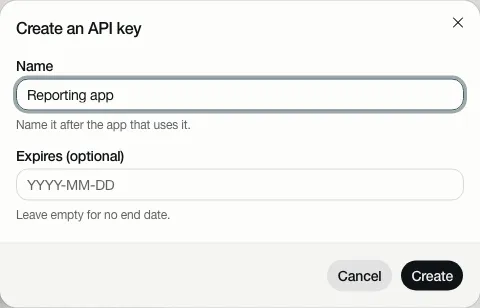
Een sleutel leest één organisatie, als Lezer, en nooit meer: behalve lezen kan hij alleen een vraag over een
definitie stellen, zoals een lezer dat kan. Hij krijgt nooit de tools die alleen een persoon heeft (de tabel
hierboven): run_dax, een wijziging van een KPI voorstellen of erover beslissen, en werken aan een open punt. Wie een
sleutel heeft is geen persoon met een naam, en die zijn daarvoor nodig. Intrekken stopt hem meteen.
Standaard leest een sleutel alleen definities. Wil je dat een applicatie KPI’s laat berekenen, dan zet een Beheerder Query’s via de API toestaan aan onder Organisatie bewerken.
De API-documentatie
Section titled “De API-documentatie”Je ontwikkelaars vinden elke route van de API, met wat die vraagt en wat die antwoordt, op de pagina
API-documentatie: /api/v1/docs op het adres van je Depositori, zoals https://depositori.example/api/v1/docs.
API-sleutels op de pagina Organisatie linkt ernaar. De pagina is in het Engels.
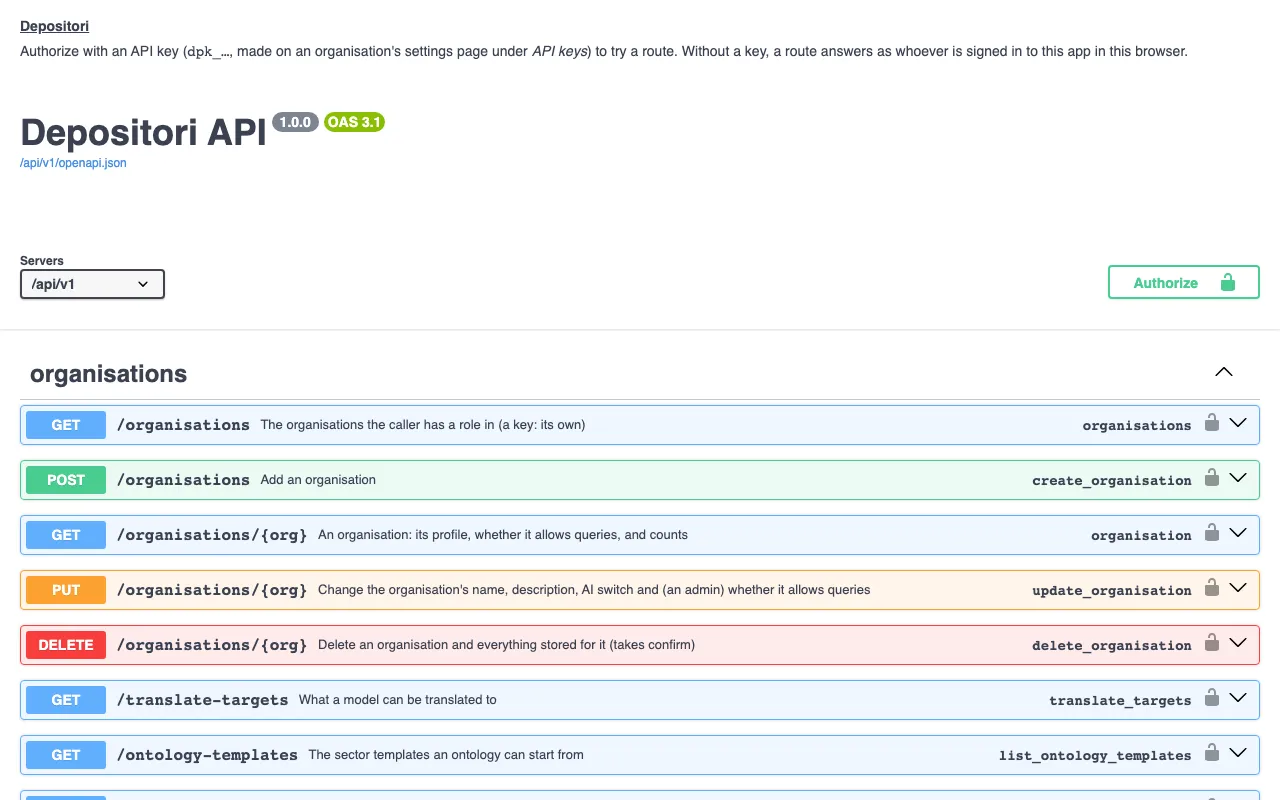
- Open de pagina. Je hoeft je niet aan te melden: er staan geen gegevens van een organisatie op.
- Om een route te proberen kies je Authorize, plak je een API-sleutel (die begint met
dpk_) en kies je nog eens Authorize. De pagina vergeet de sleutel als je hem sluit. - Open een route, kies Try it out, vul in wat die vraagt (zoals het id van je organisatie) en kies Execute. Het antwoord staat eronder.
Zonder sleutel antwoordt een route als wie er in die browser bij Depositori is aangemeld, met diens rol. De pagina laadt niets van andere websites.
Dezelfde beschrijving, als bestand voor tools die OpenAPI lezen, staat op /api/v1/openapi.json.