For applications
People read Depositori in the browser. Software reads the same definitions in two ways. Both are on the Organisation page.
Connect an AI agent (MCP)
Section titled “Connect an AI agent (MCP)”For Claude, ChatGPT or another AI agent that you use yourself.
- Open Organisation and find Connect an AI agent.
- Copy the address and add it in your agent as a connector. The steps for Claude, ChatGPT and Claude Code are under the address.
- The agent asks you to sign in to Depositori once. After that it works in your organisation as you, with your role.
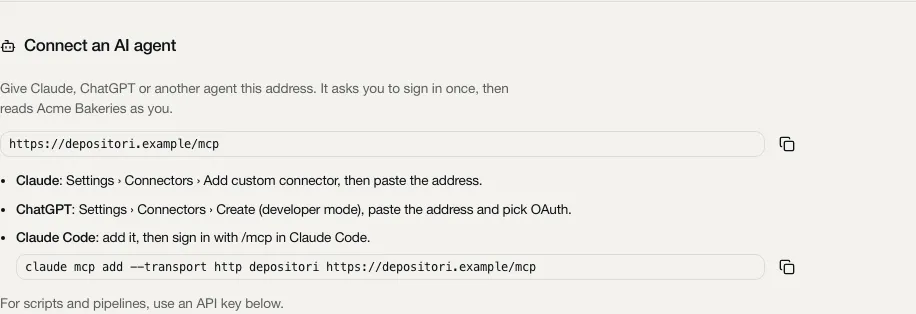
Nothing to paste besides the address, and no key to keep safe. You see and disconnect your agents under your name at the bottom left, Connected apps.
What an agent can do
Section titled “What an agent can do”Everything you can do in the app, your agent can do too, as a tool, and nothing more. It gets the tools of your role: a reader’s agent reads, asks questions and suggests changes to KPIs; a contributor’s also edits the glossary, notes and descriptions; an owner’s also manages connections, imports and people; an admin’s also manages the workspace. Your role is checked again in the organisation each call names. A tool your role doesn’t have is not listed, and calling it anyway is refused before it runs.
- As you. An agent connected this way acts in your name. What it changes is recorded as yours, for example in the history of a KPI or an open point. A KPI suggestion, an approval and every change to an open point are always made by a person, so only an agent signed in as you can make them, not an API key.
- It asks first. What can’t be undone, such as deleting an import or a connection, removing a person or revoking an API key, needs an explicit confirmation in the tool. A well-behaved agent asks you before it confirms.
- Live numbers. The number tools (
query_kpi,query_metrics,list_values,run_dax) are there only when an Admin allowed queries for the organisation (Allow queries through the API under Edit organisation).run_daxruns a DAX query of the agent’s own on a model, so it can return detail rows, not only totals: at most 200, with personal and restricted columns left out and e-mail addresses masked. That is why it is only for a person signed in, never for an API key.
What stays in the app
Section titled “What stays in the app”A few things are never done by an agent. For those, the agent gives you a link to the right form in the app, for you to open:
- Secrets: creating an API key (its token), adding a database login, setting the AI key, and adding or changing a company sign-in (its client secret). A password, key or client secret never goes through an AI’s context.
- Sign-ins: connecting a Microsoft account or another source account, which happens in your browser.
- Uploads: files such as a Power BI template.
- Confirming that another tool server’s tool only reads (It only reads): an agent doesn’t vouch for the tools it may then call itself.
- Approved audiences: where an organisation’s app-account tokens may be sent, an Admin’s choice.
- Taki’s chat: the agent is the AI itself, and gets Taki’s tools to read and compute.
Every tool, per role
Section titled “Every tool, per role”Each role has the tools of the roles above it in the list, and more. A person’s only means that an API key never gets the tool. Choose a role to see its tools.
Reader (59 tools)
| Tool | Does | Hints |
|---|---|---|
approve_kpi_suggestion | Approve a suggestion on a KPI you own | destructive, a person's only |
call_tool | Run a read-only tool of a connected MCP server | reads, open world |
compare_model | A model's original source, its Ossie document and its translation to target side by side, per dataset, field, relationship and metric | reads |
confirm_open_point | Confirm that the source now matches the approved definition, after the model was read again: the point closes | destructive, a person's only |
decline_open_point | Close an open point as won't do, with the reason | destructive, a person's only |
describe_metric | A metric of a model | reads |
describe_table | A table of a model | reads |
draft_open_point_query | Have the organisation's AI draft the proposed query of an open point (replacing the one there), marked as an AI draft that a person checks | destructive, open world, a person's only |
find | Find KPIs, metrics and tables by the organisation's own words, best first, each with why it matched (its name, a synonym, a concept, its definition) | reads |
fork_kpi_suggestion | Make a suggestion on a KPI you own a new KPI of its own, named name | adds, a person's only |
get_analyst_status | Whether Taki, the organisation's AI analyst, can answer and, for what is missing, who may fix it | reads |
get_concept | A business concept | reads |
get_connection_metadata | A warehouse connection's latest metadata snapshot (a summary, or with full every definition) and its history | reads |
get_job | One of your jobs | reads |
get_kpi | A KPI in full | reads |
get_kpi_governance | A KPI's owners (by display name), its open suggestions to change the definition with who approved and who is still to, the history of suggestions and decisions, and what uses it (models, Power BI reports, dbt models, agents) | reads |
get_model | A model as the site shows it | reads |
get_model_document | A model as a document | reads |
get_model_versions | The model's versions per object of its Ossie document | reads |
get_ontology | The ontology as its stored YAML text (null when there is none yet), with its version and last change | reads |
get_open_point | One open point in full: the approved definition, the metric's query when raised and as last read, the proposed query, what uses the KPI, and the history | reads |
get_organisation | An organisation | reads |
get_profile | What KPIs inherit | reads |
get_session | The account you read the organisation's sources with, or null | reads |
get_setup | Where the organisation stands, step by step, and the next step | reads |
get_structure | The parts of the organisation KPIs are grouped by | reads |
list_accounts | The accounts you see in the organisation (your own and its app accounts) | reads |
list_concepts | Every business concept | reads |
list_connection_tools | An MCP connection's tools as last read, each with whether it may be called, and whether you are signed in to it (search_tools and call_tool use them) | reads |
list_credentials | The stored logins of the organisation you may see | reads |
list_imports | The organisation's imported models (each with its id, source and state) and your reads that are running | reads |
list_jobs | Your recent jobs in the organisation (imports, reads), newest first | reads |
list_kpis | Every KPI | reads |
list_models | The organisation's semantic models | reads |
list_ontology_templates | The sector templates an ontology can start from | reads |
list_open_points | Open points for engineers: changes to a model's metric that an approved KPI definition asks for (or that someone raised by hand), on models you may see | reads |
list_organisations | The organisations you have a role in, each with your role and whether it allows queries | reads |
list_questions | The organisation's open questions about its definitions (a KPI's unit, a metric's meaning), for contributors to answer | reads |
list_reports | What the reports built on an import's model use, as last read | reads |
list_source_kinds | The kinds of source a model can be imported from (Power BI, dbt, a database, ...) | reads |
list_sources | The data sources the organisation's models read, each with the connection it matches, and the connections to suggest | reads |
list_systems | The business systems the data comes from (a till, an ordering platform), with the tables from each | reads |
list_translate_targets | The platforms a model can be translated to with Ossie's converters (translate_model, compare_model) | reads |
list_values | The exact values of a column (Table[Column]) to filter query_kpi on, optionally only those containing a text | reads, where queries are allowed |
list_waiting_suggestions | The open suggestions on KPIs you own that wait for your approval | reads |
mark_open_point_done | Say the change is made in the source; the point then waits for the model's next read and a confirmation | adds, a person's only |
metric_sql | One SQL statement that computes a metric on the warehouse in a filter context | reads |
query_kpi | Compute a KPI the way the organisation defines it | reads, where queries are allowed |
query_metrics | Compute metrics of a model by name (describe_table and find name them), for what query_kpi can't express | reads, where queries are allowed |
raise_question | Ask the organisation a question about one of its definitions, for a contributor to answer | adds |
refresh_kpi_suggestion | Bring a stale suggestion (the KPI's approved text changed since it was made) up to date | destructive, a person's only |
reject_kpi_suggestion | Reject a suggestion on a KPI you own, with the reason | destructive, a person's only |
run_dax | Run a DAX query (EVALUATE ...) on a model | reads, where queries are allowed, a person's only |
search_tools | Find tools of the organisation's connected MCP servers (Jira, a database, its own tools) that can answer a question, by what they do | reads, open world |
set_open_point_proposal | Write or replace the proposed query of an open point (empty removes it); nothing is written to the source | destructive, a person's only |
starter_questions | What to ask about a model first | reads |
suggest_kpi_change | Suggest a change to a KPI's definition and/or calculation note, with the reason | adds, a person's only |
translate_model | Translate a model to another platform (list_translate_targets) with Ossie's converters | reads |
withdraw_kpi_suggestion | Withdraw a suggestion you made while it is open | destructive, a person's only |
Contributor (21 tools)
| Tool | Does | Hints |
|---|---|---|
add_discovered_kpis | Make these KPIs found across the models (their keys, from list_discovery) draft KPIs, linked in every model, with a question on which definition leads where they differ | adds |
add_kpi_candidates | Make these KPI candidates (their ids, from list_kpi_candidates) draft KPIs, linked to their measures, with a question where a candidate has several | adds |
answer_question | Answer one of the organisation's questions (list_questions) | destructive |
apply_ontology_template | Merge a sector template (list_ontology_templates) into the ontology | adds |
check_metric | Check a metric's SQL translation on the warehouse against Power BI, as a grand total or by group_by [table, column] | adds |
dismiss_kpi_candidates | Leave these KPI candidates out for good | destructive, confirm |
dismiss_question | Take a question off the list unanswered | destructive |
draft_descriptions | Have Claude draft descriptions and synonyms of an import's tables and metrics from their names, columns and expressions (with the organisation's AI on) | destructive, open world |
draft_metric | Have Claude draft a SQL translation of a DAX measure the translation rules can't translate (with the organisation's AI on) | adds, open world |
edit_ontology_item | Add (item, no id), change (id and item | destructive, confirm |
explain_discovered_kpi | What the definitions of one KPI found across the models count differently, in plain words, by Claude (with the organisation's AI on), from the definitions only | reads, open world |
list_discovery | The organisation's KPIs found across all its models, each with the models it is in, and where their definitions differ | reads |
list_kpi_candidates | An import's KPI candidates, best first | reads |
propose_link | Propose that a model object is a KPI or is about a concept, as a draft for the organisation to review (never a reviewed link) | adds |
raise_open_point | Raise an open point by hand for the engineer: on a KPI (a point per model that computes it) or on one metric, with a note | adds, a person's only |
read_reports | Read again from Power BI what the reports built on a Power BI import's model use (list_reports gives the last read), as the organisation's account in use | adds |
reopen_question | Put an answered or dismissed question back on the list | destructive |
replace_ontology | Replace the whole ontology with this YAML text | destructive, confirm |
review_link | Review a link of a KPI or concept to a model object | destructive, confirm |
set_description | Write, change or remove (empty or null) the description of a table, or of one of its columns, by hand | destructive |
set_import_note | Set one note on an import that its definition doesn't say, kept across re-imports | destructive |
Owner (47 tools)
| Tool | Does | Hints |
|---|---|---|
add_connection | Add a connection of type (powerbi, azure_sql, dbt, mcp, ...) with its type's fields | adds |
app_link | The link to the app's own form for what no tool does, for the person to open | reads |
assign_open_point | Give an open point to another engineer, by member key | destructive, a person's only |
copy_import | Copy an import under a new name, without reading its source again | adds |
delete_connection | Delete a connection (models read through it stay) | destructive, confirm |
delete_credential | Remove a stored login of yours and its secret | destructive, confirm |
delete_import | Delete an import of yours, its model and what is kept with it | destructive, confirm |
discover_connection | What a login can see for a connection being filled in (its servers, databases, workspaces), to pick its fields from | reads, open world |
get_ai_key | Whose AI key the organisation uses (its own, the workspace's, none) | reads |
get_import_progress | How the read of an import goes | reads |
get_powerbi_catalog | Every workspace a Power BI connection's account can see, with its models and what is imported already | reads |
import_all | Import these Power BI models ([{workspace_id, workspace, dataset_id, dataset_name}] from get_powerbi_catalog), a job each (list_jobs) | adds, open world |
import_connection | Read a connection into a model named name (a database's tables, a Superset's datasets, a dbt project), only schemas if given | adds, open world |
import_powerbi_model | Read a Power BI model (dataset_id and dataset_name, from list_connection_models or get_powerbi_catalog) through a connection, or a workspace_id and workspace | adds, open world |
invite_member | Invite someone by e-mail as contributor or reader (someone who signed in before gets the role at once), or take an invite back with role null | destructive, confirm |
link_source | Say a model's source at this location ({server, database, ...} as list_sources shows it, or {database}) reads through this connection, so lineage follows it | adds |
list_approved_audiences | The token audience and host pairs an admin approved for the organisation's app accounts | reads |
list_connection_datasets | The datasets an Amazon QuickSight connection's login can see, with their folders and kind | reads |
list_connection_models | The semantic models in a Power BI connection's workspace, with what is imported already | reads |
list_connection_schemas | The schemas of a database connection, with how many tables and views each holds | reads |
list_members | The organisation's members (user id, role, e-mail and name as the app shows them to an owner), its waiting invites and its API keys (never a token) | reads |
list_powerbi_reports | The Power BI reports the account in use can see, with the models they are built on | reads |
list_powerbi_workspaces | The Power BI workspaces the account in use can see | reads |
read_connection_metadata | Read a warehouse connection's metadata again and rebuild the models' lineage | adds |
read_connection_tools | Read an MCP connection's tools again from its server (list_connection_tools gives the last read) | adds, open world |
refresh_import | Read an import again the way it was made | destructive, open world |
remove_account | Remove an account and its tokens | destructive, confirm |
remove_ai_key | Remove the organisation's own AI key | destructive, confirm |
revoke_api_key | Revoke an API key (its id, list_members) | destructive, confirm |
set_connection_analyst | Let Taki run read-only SQL on this database connection (on), or not | destructive |
set_connection_per_user | Whether each person signs in to this MCP connection's server themselves (on) or it reads with one shared login | destructive, confirm |
set_connection_visibility | Share a connection of yours with the organisation (entity) or make it private | destructive |
set_import_schedule | Read an import again on a schedule | destructive |
set_import_visibility | Share an import of yours (its id, list_imports) with the organisation (entity) or make it private | destructive |
set_kpi_owners | Assign a KPI's owners, by the member keys get_kpi_governance lists under members | destructive, a person's only |
set_member | Give a member (their user id, list_members) the role contributor or reader, or remove them with role null | destructive, confirm |
set_profile | Change the organisation profile (locale, reporting_currency, vat, fiscal_year_start, week, time_zone, about, sites, groupings, steering) | destructive, confirm |
sign_out_account | Sign an account out (list_accounts) | destructive |
sign_out_session | Sign out the account you read the organisation's sources with | destructive |
test_connection | Test a connection | adds, open world |
test_new_connection | Test a connection before adding it, with the same arguments as add_connection | reads, open world |
unlink_source | Take a link_source back | destructive |
update_connection | Change a connection's name, fields and login | destructive |
update_credential | Rename a stored login of yours (list_credentials) or change who may use it | destructive |
update_organisation | Change the organisation's name, its description (empty removes it), AI on or off (on needs an AI key) and, as an admin only, whether it allows queries | destructive |
use_account | Read the organisation's sources with this signed-in account (list_accounts) from now on | destructive |
download_my_data | Everything this workspace stores about the person the agent acts for, and nothing about anyone else; never for an API key (parity.PERSON_ONLY) | reads |
Admin (11 tools)
| Tool | Does | Hints |
|---|---|---|
create_organisation | Add an organisation | adds |
delete_organisation | Delete an organisation (its id, always given) and everything stored for it | destructive, confirm |
get_workspace_ai_key | Whose AI key organisations without their own use (the workspace's, none) | reads |
list_monitors | The monitors that read the workspace's status (docs/monitoring.md): name, host, who allowed it, last used | reads |
list_sign_ins | The workspace's own sign-ins (identity providers) | reads |
list_workspace_people | Everyone in the workspace with their organisations and roles there, whether they are admin and why, and the waiting invites | reads |
remove_sign_in | Remove one of the workspace's sign-ins (its id, list_sign_ins) | destructive, confirm |
remove_workspace_ai_key | Remove the workspace's AI key | destructive, confirm |
revoke_monitor | Revoke a monitor's token (its id, list_monitors) | destructive, confirm |
set_workspace_admin | Make someone (their user id, list_workspace_people) admin of the workspace, or take it back | destructive, confirm |
workspace_app_link | The link to the app's Workspace settings for what no tool does, for the person to open | reads |
Other tool servers behind Depositori
Section titled “Other tool servers behind Depositori”An owner can add another MCP server as a connection (Add connection, MCP server), such as Jira, Atlassian or Notion. Your agent then reaches its tools through Depositori’s own address. Depositori reads the server’s list of tools; only the tools an owner confirms as read-only (It only reads) can be called. A tool that changes data is never run.
- The Server URL is the server’s address, such as
https://mcp.example.com/mcp. On a hosted Depositori it must be a publichttps://address; anhttp://address, or one on an internal network, is refused. - The server reads with an API token, an OAuth sign-in, or nothing, as it needs.
Your accounts for agent tools
Section titled “Your accounts for agent tools”Some tool servers read as each person. Then the Organisation page shows everyone, readers included, the section Your accounts for agent tools. Choose Connect account next to a server to connect your own account; your agent’s calls to that server then use it, and you see only what your own account allows. Connect again renews it.
API keys
Section titled “API keys”For scripts, pipelines and applications that run without a person. You need the Owner role.
- Open Organisation and find API keys.
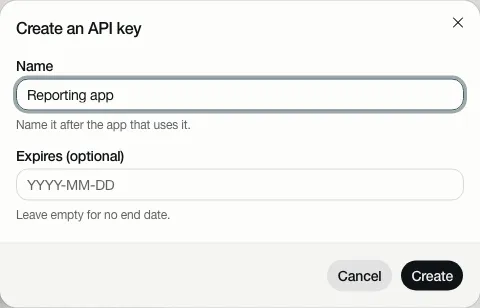
- Choose Create key, name it after the application that will use it, and choose Create.
- Copy the key now. You will not see it again.
A key reads one organisation, as a Reader, and never more: besides reading, the only thing it can do is raise a
question about a definition, as a reader can. It never gets the tools that are a person’s only (the table above):
run_dax, suggesting or deciding a KPI change, and working on an open point. Whoever holds a key isn’t a named person,
and those need one. Revoke stops it at once.
By default a key reads definitions only. For an application to have KPIs computed, an Admin turns on Allow queries through the API under Edit organisation.
The API documentation
Section titled “The API documentation”Your developers find every route of the API, with what it takes and what it answers, on the API documentation
page: /api/v1/docs on your Depositori’s address, such as https://depositori.example/api/v1/docs. API keys on
the Organisation page links to it.
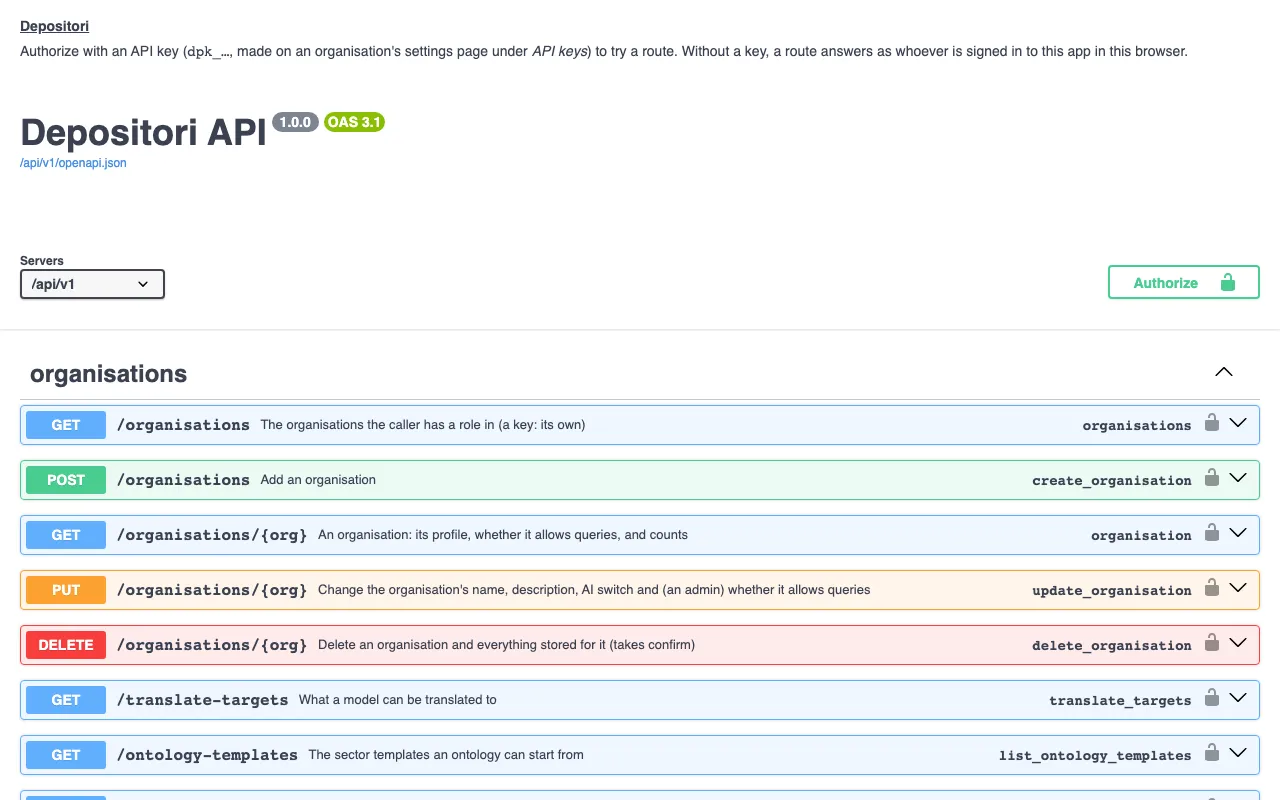
- Open the page. It needs no sign-in: it holds no data of any organisation.
- To try a route, choose Authorize, paste an API key (it starts with
dpk_) and choose Authorize again. The page forgets the key when you close it. - Open a route, choose Try it out, fill in what it asks (such as your organisation’s id), and choose Execute. The answer shows below it.
Without a key, a route answers as whoever is signed in to Depositori in that browser, with their role. The page loads nothing from other websites.
The same description, as a file for tools that read OpenAPI, is at /api/v1/openapi.json.