Taki, the AI analyst
Taki answers questions about your models: what a metric means, how it is calculated, where it comes from, and what the number is. It is an AI model (Claude, by Anthropic).
AI settings
Section titled “AI settings”Everything about AI is in one place: Organisation, section AI. Links elsewhere in the app that say AI settings, AI on or AI needs a key lead here.


The section says whether AI is on, whether there is a key and where it comes from, and what goes to Anthropic:
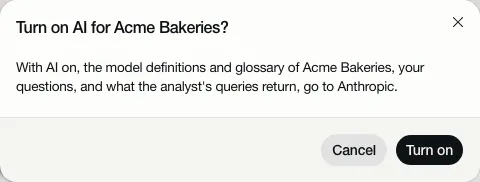
With AI on, the model definitions and glossary of your organisation, your questions, and what Taki’s queries return, go to Anthropic.
With AI off, everything else works: reading models, lineage, search and the glossary.
Turn AI on
Section titled “Turn AI on”An Owner chooses Turn on AI. AI turns on only with a key:
- There is a key (the organisation’s own or the workspace’s): the owner turns it on.
- There is no key yet: the owner gets Add key and turn on; AI goes on once the key is saved. Anyone below owner reads “There is no AI key yet, so AI can’t be turned on.” and asks an owner to add the organisation’s key, or their admin for a workspace key.
Turn off AI stops Taki, the AI descriptions and the metric drafts. The key stays.
The key
Section titled “The key”AI needs your own key from Anthropic. Depositori has no AI key of its own: AI works only with a key that belongs to you, in one of two places:
- The organisation’s own key. An Owner chooses Add key (or Replace key) in the AI section.
- The workspace’s key, for every organisation without its own. Only a workspace admin sets it, under Workspace settings.
With neither, AI is not available: add your organisation’s key, or ask your admin for a workspace key.
With your own key, your own agreement with Anthropic applies to what goes there: Anthropic processes it for you, under the terms you accepted with them, and bills you for it.
The key is checked with Anthropic and stored encrypted; nobody can view it again, the owner who added it included. One person can have at most 5 keys checked in 10 minutes; after that the app says “too many keys tried: wait a few minutes before trying another”. Remove key lets the workspace’s key take over, if there is one; without it, AI stops working until a key is added.
AI on, but no key
Section titled “AI on, but no key”An organisation can have AI on and no key, for instance when the key was removed. Nothing breaks: the AI section says “AI is on, but it does not work yet: there is no key.”, and Taki says the same with Add key for an owner, or whom to ask for anyone else. AI works again as soon as a key is added.
Who can ask
Section titled “Who can ask”Everyone in the organisation, readers included. Taki always answers about the definitions: what a metric means, how it is calculated, where it comes from.
Live numbers
Section titled “Live numbers”For numbers from a Power BI model, Taki asks Power BI, with an account:
- An Owner connects their own Microsoft account (Connect Microsoft account). They get what that account may see in Power BI, no more.
- Anyone else reads with the organisation’s app account. A workspace admin puts one in use.
Without an account, Taki says “Live numbers from Sales need an account. Taki answers about its definitions meanwhile.” and offers the step, or says whom to ask.
Numbers from a database
Section titled “Numbers from a database”For numbers from a database, its connection needs Taki may query, on the connection’s card. Only the connection’s owner can turn it on. Taki then runs read-only queries there and sends the rows to Anthropic. It skips columns whose names point to personal data:
- names, email addresses, phone numbers, addresses, identity and bank numbers, pay;
- health and absence: verzuim, ziekte, ziekmelding, arbo, sick leave, illness, diagnosis, medical,
disability (arbeidsongeschikt), pregnancy (zwanger), in any form such as
verzuim_dagen,ZiekteVerzuimPctorSickLeaveDays; - personnel and employee numbers and keys: personeelsnummer, medewerkernummer,
employee_id,EmpNo,mdw_id,employee_key,worker_id.
The same check holds for live numbers from Power BI, and for a column renamed in the model but loaded from such a column. Because Taki can’t name an employee number or key, it can’t join on one in SQL either.
A score or check of something else stays readable: a customer account’s health_score, a system’s health_check,
an is_disabled flag, a headcount such as employee_count. The check goes by names only: a column
whose name doesn’t say what it holds is not recognised. For HR and absence data, give the connection’s login access to
aggregated views only.
The full list of what goes to Anthropic is on What Depositori reads and sends.
Superset and QuickSight models have no Taki may query: Taki answers about their definitions only.
Applications
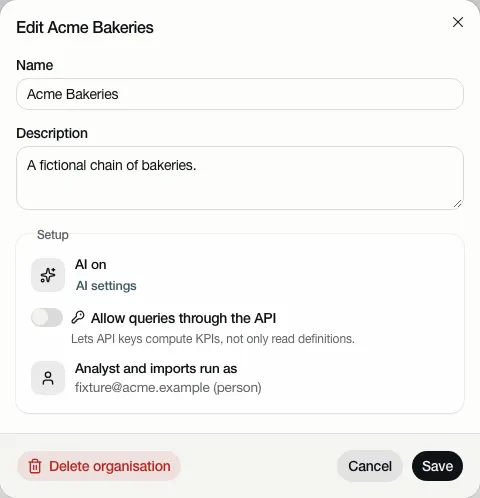
Section titled “Applications”Allow queries through the API, under Edit organisation, lets applications with an API key have KPIs computed. Only an Admin turns it on. See For applications.
When Taki assumes something
Section titled “When Taki assumes something”If your question leaves something open, Taki picks the likeliest meaning, answers, and says what it assumed.
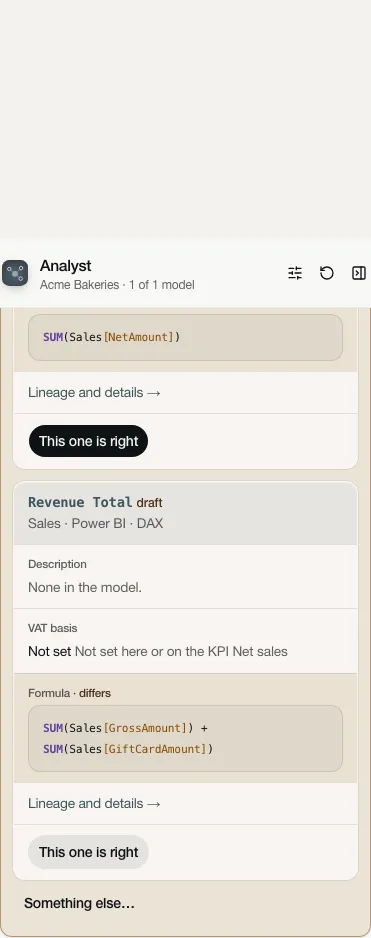
Confirm it or pick another. Your answer is saved as a draft on the KPI, so the next person gets the same meaning. Open questions are collected on Glossary, Open questions.
Taki can be wrong. Check numbers before you share them.